Native desktop · Rust + Ollama · Linux / macOS / Windows
Turn long YouTube videos into reusable intelligence.
ClipTube AI extracts transcripts, builds summaries, surfaces key points, gives you a contextual AI chat, and turns video knowledge into text you can paste, refine and share fast.
Core capabilities
Everything you need to go from “I should watch that later” to “I already extracted the value.”
Transcript first
Paste a YouTube URL or ID and recover the full transcript as the source of truth.
AI summary
Generate clean summaries optimized for understanding, scanning and reuse.
Key points
Extract the ideas worth remembering without hunting through the full video.
Contextual AI chat
Ask direct questions about the video and refine outputs without leaving the app.
Ready-to-share text
Produce polished text blocks you can paste into chats, notes, docs or posts.
Live Ollama model selector
Load available models straight from Ollama and swap them from the UI.
Multilingual aware
System-language detection and multilingual support make the app friendlier out of the box.
Native Rust desktop
Built with Rust + eframe/egui for a fast, local-first desktop workflow.
How it works
Fast enough for daily use. Structured enough for real work.
Paste the video
Drop a YouTube URL or video ID into ClipTube AI.
Fetch the transcript
Pull the raw transcript and prepare the source material for analysis.
Generate useful output
Create summaries, key points, AI answers and share-ready text blocks.
Copy, refine, publish
Reuse the result in messages, docs, notes, research workflows or content pipelines.
Platform support
Download the build that fits your desktop.
🌐 Web
Browser app
Open the web runtime with Ollama connection, transcript backend support and the same core flow as the desktop app.
🐧 Linux
AppImage
Portable Linux build with desktop integration support.
Get Linux build🍎 macOS
DMG + App bundle
Drag-and-drop installation flow plus zipped `.app` bundle for releases.
Get macOS build🪟 Windows
ZIP / EXE
Native executable package with Windows icon resources included.
Get Windows build
Setup
Configure ClipTube AI in a few minutes.
Whether you use the desktop app or the web runtime, the basic setup is the same: make sure Ollama is running, point ClipTube AI to the right host and port, and use the transcript backend when you want reliable browser-side transcript fetching.
Start Ollama
Run your local Ollama instance and confirm your models are available. The default ClipTube AI connection expects 127.0.0.1:11434.
Configure host and port
In the app settings, set the Ollama host and port, or provide a full endpoint override if you use a remote instance.
Use the transcript backend for the web app
For the browser version, run the local runtime server and keep the transcript backend pointing to the same origin so YouTube transcript requests can be resolved server-side.
Pick your model and output style
Once the connection is healthy, choose a model, fetch the transcript, and generate summaries, key points or share-ready text.
Recommended local command for the web runtime:
Installable PWA + local full mode
On GitHub Pages, ClipTube AI Web works as an installable PWA and can cache the interface offline. For full transcript fetching and Ollama-powered analysis, use the local web runtime.
Open local runtime
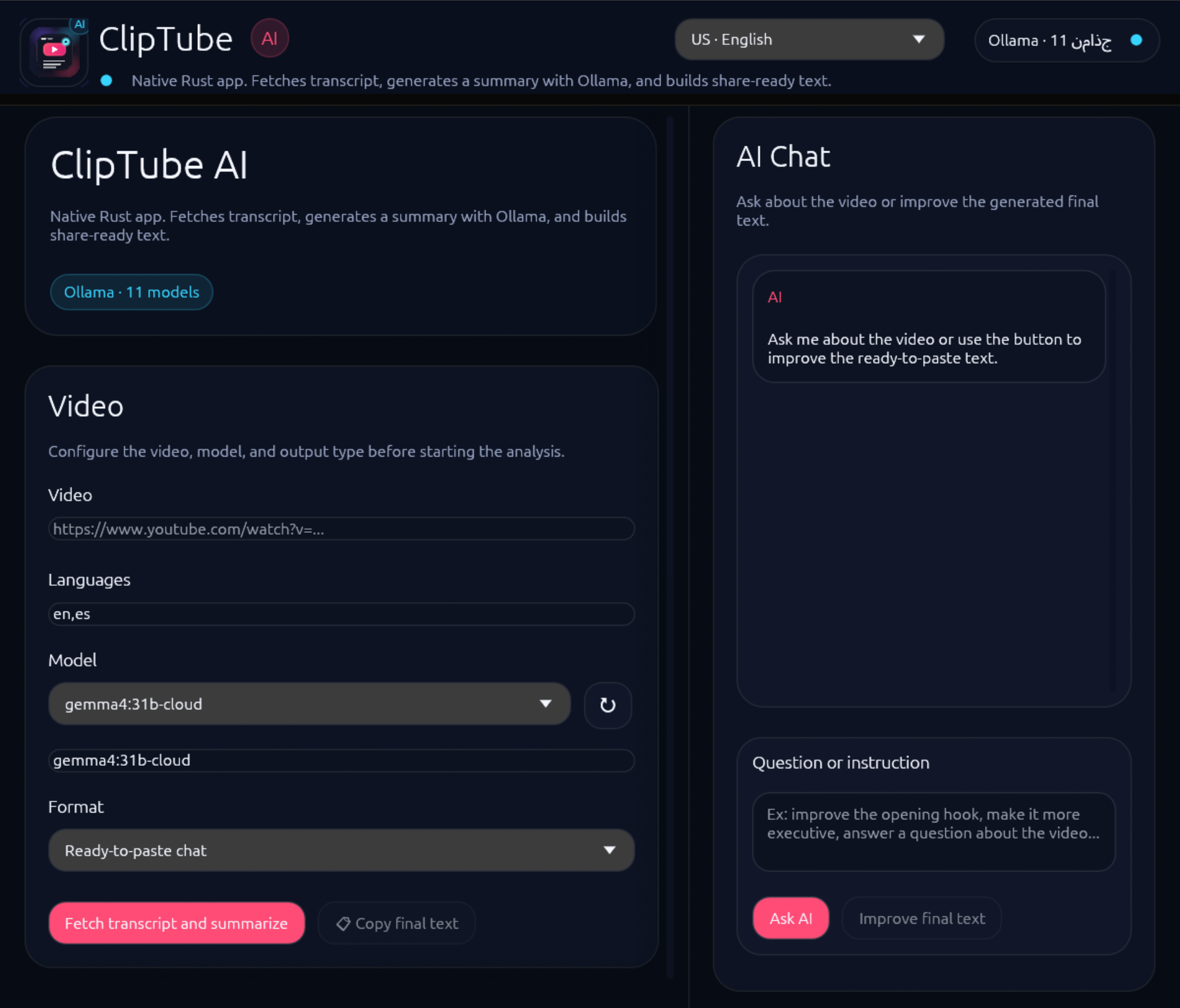
Preview
Built for serious note-taking, summarization and content reuse.
The preview below is a polished placeholder composition until final product screenshots are added. The section is already structured so you can swap in real captures later without changing the page layout.
Open source
Local-first workflow. Native desktop feel. Transparent stack.
Rust + eframe/egui
Native desktop experience with a modern Rust stack.
Ollama integration
Use your local model catalog instead of locking everything behind a hosted SaaS.
GitHub-native
Releases, packaging, icons and automation are all versioned in the repo.
Want to inspect the code, follow releases, or contribute?
FAQ
Quick answers before you download.
Does ClipTube AI need internet?
You need internet to access YouTube content. The AI model side is designed around Ollama, so summarization and chat can run with your local setup.
Does it work with Ollama locally?
Yes. ClipTube AI can list models directly from your local Ollama instance and use them for summaries and chat.
Is it available for Linux, macOS and Windows?
Yes. The project is prepared to publish Linux AppImage, macOS DMG / app bundle, and Windows ZIP / EXE packages.
Is it open source?
Yes. The repository, release automation, packaging and assets are meant to be shared publicly through GitHub.